 Voxley
Download Voxley for Mac.
Private dictation, wherever you type. Every feature is free.
Free software. Supported by people.
Every Voxley feature is free. If it saves you time, a tip helps support development and future updates.
Buy me a coffeeTips are entirely optional. Voxley remains free.
Voxley feedback
Report a bug, suggest a feature, or tell us how Voxley is working for you.
Send FeedbackApple silicon · macOS 26 or later
New in 1.0.10: A warm gold accent and five support options in About Voxley.
Signed by Protomota · Notarized by Apple · Signed automatic updates
How to install Voxley
- Open the disk image.
Open
Voxley-1.0.10.dmgin Downloads. Drag Voxley into Applications, then eject the disk image.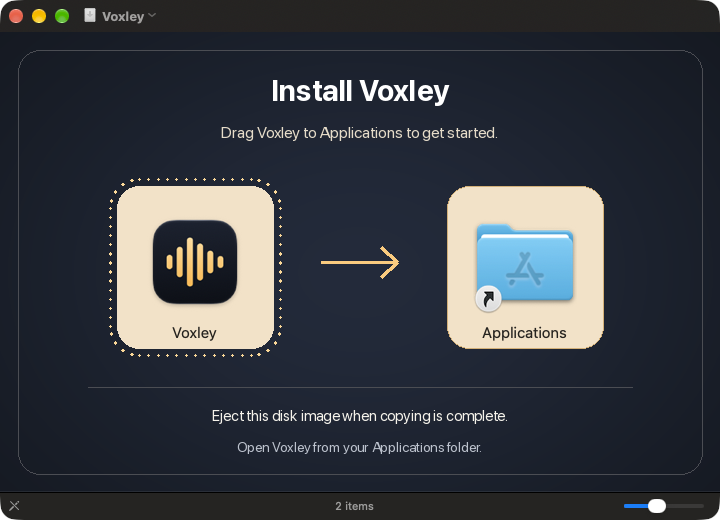
Drag Voxley onto Applications. - Launch Voxley from Applications.
If macOS asks for confirmation, choose Open. Look for Voxley’s waveform icon in the menu bar and open Voxley Onboarding.
- Allow microphone access and automatic paste.
In onboarding, click Allow Microphone. Under Automatic Paste, click Open System Settings and enable Voxley in the privacy pane it opens. Return to Voxley and click Check Permissions Again.
- Try your shortcut.
Click the Practice dictation field, hold Control–Shift–Space, speak, then release to paste. You can record a different shortcut in onboarding.
Verify your download
In Terminal, run shasum -a 256 ~/Downloads/Voxley-1.0.10.dmg and compare the result with this SHA-256 checksum.
4b1298fc323d5aa18be7b009a9b1df5654acfe29443c205afe3a2b13246a31b8